
Dear Valued Customers,
Thank you for your business and continued interest in Mircom’s Fire Alarm Systems.
The FX-400/FX-401 Firmware and Configurator have been updated to SO-434 V2.2.2 and MSW-045 V2.2.2 respectively. Going forward, all newly produced panels will be equipped with this firmware and configurator version or a higher one. The latest panel firmware and configurator introduce enhancements to existing functionality, along with new programming features designed to streamline and accelerate panel setup.
Please note that if your panel does not require any of the newly introduced features shown below, no upgrade to the firmware or configurator is necessary. To identify the firmware version of the panel, please refer to the sticker label found on the carton box of the panel or the mainboard

Note: Ensure the job file is backed up prior to upgrading any firmware to v2.2.2, since the old job file will be deleted once the firmware is updated to this v2.2.2 version.
The latest released firmware and configurator version include the following – for more detailed information on these new features/enhancements, refer to configuration guide (LT-6710):
Carbon Monoxide Reporting and Signaling per UL 864 Ed. 10 and ULC-S527 Ed. 4.
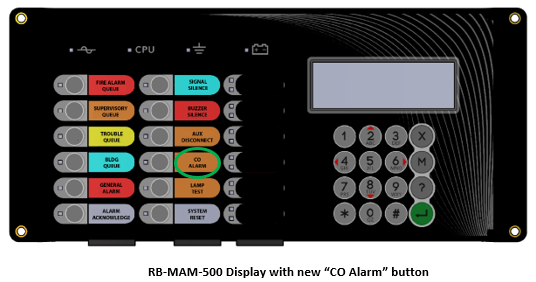
- The fire alarm panel now consists of a separate and dedicated Carbon Monoxide (CO) queue and a dedicated repurposed LED on the main display and remote annunciators for “CO Alarm” status.
- Note 1: To support CO alarm indication, a universal display overlay will be used for both the FX-400/FX-401 going forward, allowing for slide in labels which will include the “CO Alarm” marking Therefore, moving forward only the RB-MAM-3500 annunciator will be compatible with the FX-400 and FX-401 panels.
- Note 2: For existing FX-400/FX-401 panels in the field, upon firmware and configurator update to V2.2.2, the “Fire Drill” push button on the front panel will be repurposed to “CO Alarm” and the “Fire Drill” function will now be accessible through the menu options in the LCD using the cursor. (Refer to LT-6710/6671 – Command Menu section.)
Note 3: Existing FX-401 panels in the field which require an update to V2.2.2 firmware/configurator can replace the “Fire Drill” slide in label to “CO Alarm”.
For FX-400 panels in the field, which would like to update to V2.2.2 to add CO functionality, a new main display (RB-MAM-3500) will be required
- Adjusted DACT reporting to report specific CO Contact ID/SIA codes to the central station upon activation of a respective CO event.
- An optional checkbox has been added to the configurator for the Fire vs CO priority definition, with the default operations using Fire as priority over CO.
- Fire Alarms can be configured to sound specific NACs at the T3 rate while CO Alarms can be configured to sound specific NACs at the T4 rate.
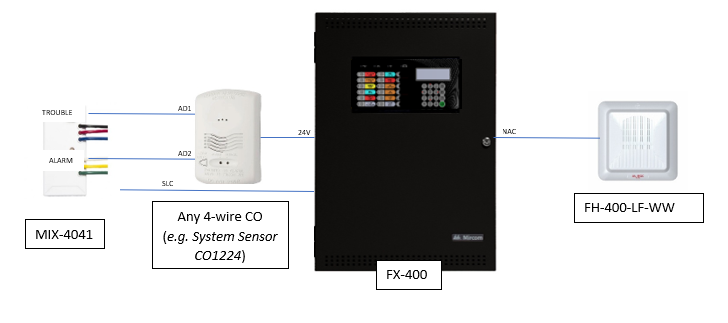
Below is a typical FX-400/401 field set up using a MIX-4041 input module (or MIX-4040), with a system sensor CO1224 and an FH400-LF-WW as the NAC output:
User Interface (UI) & User Experience (UX) Enhancements
- Simplified addition of an INX-10A Booster Power Supply to the configuration job, through a dropdown selection of the operation mode: a) Basic Single Stage, b) Basic Two-Stage, c) Enhanced Single Stage, d) Enhanced Two-Stage
- Quick Send option which allows for incremental job sends, reducing job send duration to panel, allowing for selective configuration updates as opposed to full job sends to the panel.
- Note: The major difference of the new “Quick Send” compared to the “Quick Update” feature already available in the configurator is that the Quick Send allows for the modification of all fields in the job and not limited to specific fields (Tags, Correlations, Device Types, Options).
Secondly, Quick Update needs a live connection to the panel to read the configuration in the panel and make changes to the configuration in real time, whereas Quick Send permits the use of an existing job file in the PC, then sending it through Quick Send to the panel after incremental changes are made.
- Note: The major difference of the new “Quick Send” compared to the “Quick Update” feature already available in the configurator is that the Quick Send allows for the modification of all fields in the job and not limited to specific fields (Tags, Correlations, Device Types, Options).
- Undo/Redo for reverting changes back and forth more easily through the programming process and Control + A as a shortcut for selecting all items in each configuration tab
Operational Fire Alarm Panel Improvements
- Identified specific type of event for enhanced user intuitive monitoring of the event logs
- Added support for Temporal 4 and enhancements for synchronization – UL864 R10 / ULC S529 Ed4 CO Listing
- Addition of alert tone to MGC 400 series NACs (Strobes). For Canadian applications only, eliminates the need for 4050 sync.
- Addition of new alarm and auto resound timer options within the panel menu dropdown
- Improved self-restoration of MIX-4046 output module under specific configuration conditions
- Improved buzzer silence operations for Positive Alarm Sequence (PAS)
If you have any questions or comments, please contact us directly at: [email protected]
Best Regards,
Product Management
Mircom Group of Companies